
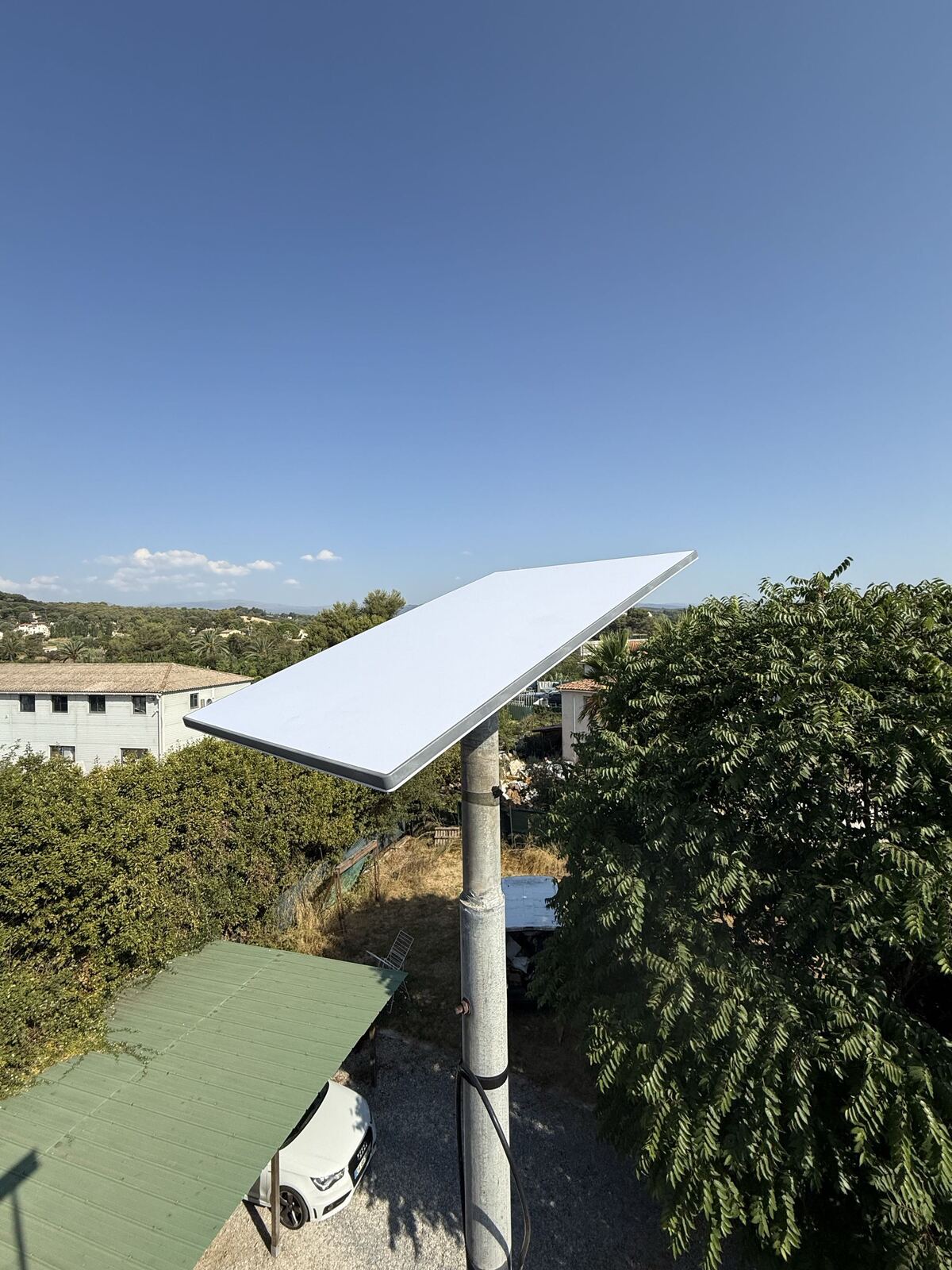
The only real question: what can your antenna see?
Starlink covers the whole of French territory. The service is therefore available at your address, wherever it is. That's almost never where the problem lies.
What determines the quality of your connection is what the antenna can see of the sky from the exact spot where it will be placed. The satellites constantly sweep from one horizon to the other: the antenna needs a wide, clear cone of sky, not just a single direction like a TV satellite dish. The slightest obstacle crossing that cone cuts the signal — briefly, but enough to interrupt a video call.
In practice, the antenna mainly looks towards the north, with a fairly wide field of view. This is counter-intuitive if you're used to south-facing satellite dishes, and it's good news: in many homes in the Alpes-Maritimes, the terrace and ornamental trees are to the south, and the north is clearer than you'd think.
What actually causes problems
Trees: the most common case
A tree is the most damaging obstacle, for a simple reason: the foliage moves. Unlike a wall, it doesn't block the signal permanently but intermittently, which produces micro-dropouts that are hard to diagnose and very unpleasant in use.
Not all trees are equal, though:
- A tree to the south of the house almost never causes a problem, since the antenna doesn't look in that direction
- A tall pine or oak to the north, less than fifteen metres away, is the most problematic scenario
- A hedge, olive trees, low trees: very often no consequence at all, raising the antenna is usually enough
- Dense woodland on every side: this is the one case where you sometimes have to give up, or consider a tall mast, or even placing the antenna a few dozen metres from the house
We often meet clients convinced it was a lost cause, for whom a two-metre mast or moving the antenna three metres across the roof solved everything.
Terrain and neighbouring buildings
A house backing onto a hill to the north, a villa tucked between two buildings, a balcony covered by the floor above: these situations call for a proper check. Here too, height solves a lot of cases — which is the whole point of a roof mount rather than a ground mount.
The roof itself
A roof slope can act as a screen if the antenna is placed on the wrong side. It's easy to fix when you think about it while choosing the location, and a hassle to correct once the fixings have been drilled. Ridge line, chimney stack, solar panels: all of this is factored in before drilling, not after.
Co-ownership and protected areas
In a building or estate with regulations, installing on a common area or a visible facade generally requires the co-ownership's agreement. In a protected area — near a listed monument, a designated site, certain hilltop villages — prior notice to the town hall may be required. This isn't a dealbreaker, but it's better to know before ordering the equipment. We'll tell you what steps to plan for according to your situation.
How to check it yourself, for free
The Starlink app, available free on iPhone and Android, includes an obstruction-checking tool. It works without owning a kit:
- Install the Starlink app on your phone
- Open the obstruction check feature
- Stand at the spot where you imagine placing the antenna, at the intended height
- Slowly sweep the sky with your phone, following the on-screen instructions
- The app displays a map of the sky, flagging any blocked areas
It's an excellent first test, and we encourage you to try it. Its limits: it only tests the exact spot where you're standing, and it won't tell you what the same measurement would give three metres higher, on the roof. That's precisely what we come to assess.
What we check during a visit
- Obstruction measurements at several locations and several heights, to find the best compromise
- The technical feasibility of the fixing according to your roof type — tiles, slate, flat roof, facade
- Wind resistance, a real concern in this region: a poorly fixed antenna becomes a projectile in a strong mistral
- The cable route to the point where you want the WiFi, and the watertight penetration required
- The presence of a power supply nearby, and earthing to protect the installation from lightning
- The actual WiFi coverage of your home, which sometimes needs a repeater or extra cabling
Cases where we advise against Starlink
We'd rather tell you before you spend several hundred euros:
- If fibre is available at your home, it will be better and cheaper. Always check this point first.
- If your plot is completely closed off to the north with no possibility of raising or repositioning the antenna, dropouts will be too frequent for comfortable use.
- If your need is very occasional, a mobile data plan with tethering may be enough and will cost much less.
Let's take a look at your situation
Describe your house to us on the phone — orientation, what's around it, where you want the WiFi — and we'll give you an honest first opinion within a few minutes. If the case is uncertain, we'll come out for an on-site check.
For any questions or additional information, you can reach us at 06 95 62 24 33, Monday to Friday from 9am to 6pm. Outside these hours, this line is reserved for emergencies, available 24/7.